If your vacuum overheats once, clean it first. If it overheats again after that, replacement is often the better call.
I’d make the decision like this:
- Repair if the issue is a clog, dirty filter, full bin, tangled brush roll, or worn belt
- Repair if the vacuum is under 5 years old
- Replace if motor work will cost $150–$300
- Replace if the repair bill is more than 50% of a similar new vacuum
- Replace if the vacuum is over 8 years old and keeps shutting off
A vacuum motor depends on airflow to stay cool. So in many cases, overheating starts with blocked airflow, not a bad motor. But if you notice burning plastic smell, sparks, smoke, grinding, or weak suction after cleaning, I’d treat that as motor trouble and stop using it.
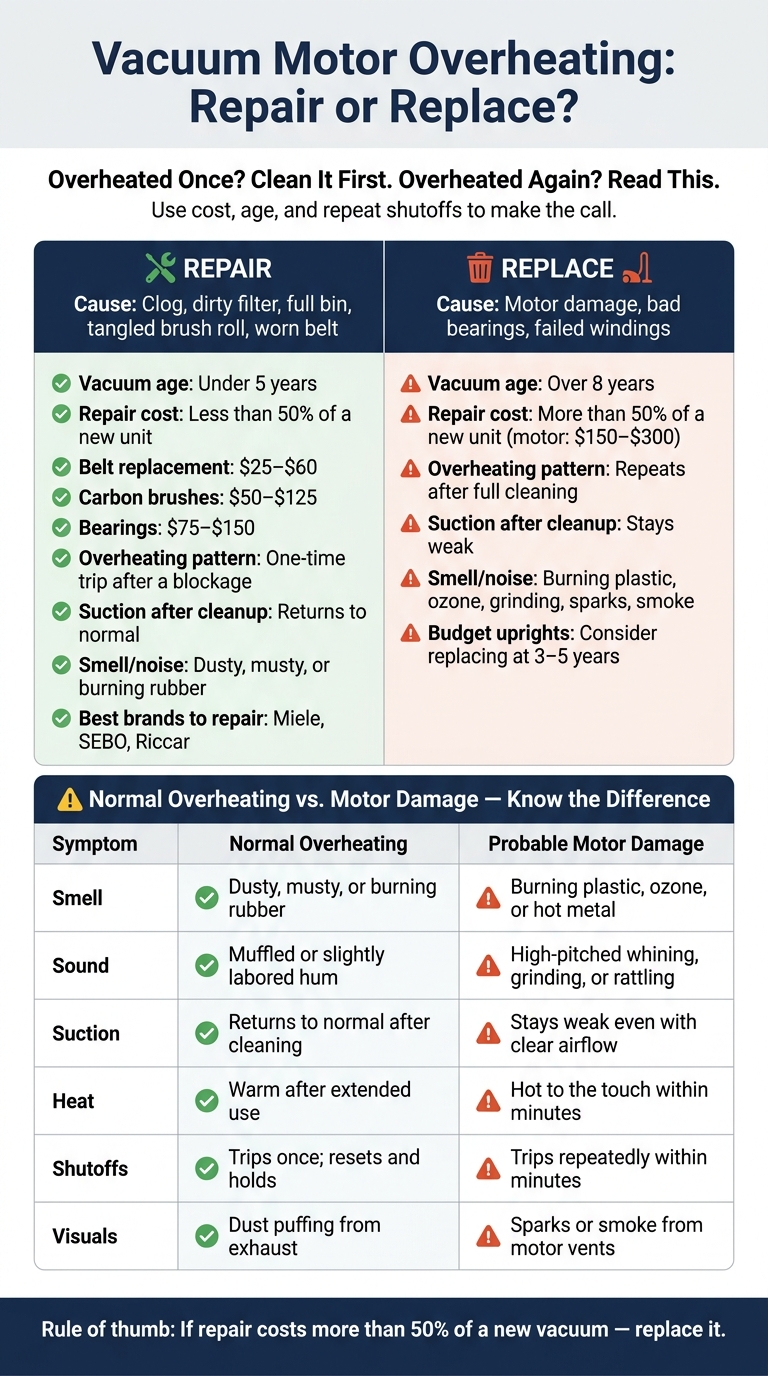
Vacuum Motor Overheating: Repair vs. Replace Decision Guide
How To Fix Hoover Windtunnel Vacuum That Turns Off After Short Use
sbb-itb-a8bcf38
Quick comparison
| Factor | Repair | Replace |
|---|---|---|
| Cause | Clog, filter, belt, brush roll | Motor damage, bad bearings, failed windings |
| Cost | Often low; belts may run $25–$60 | New motor often $150–$300 |
| Age | Under 5 years | Over 8 years |
| Shutoff pattern | One-time trip after blockage | Repeats after full cleaning |
| Suction after cleanup | Back to normal | Still weak |
| Smell/noise | Dusty smell or belt odor | Burning plastic, ozone, grinding, rattling |
In short, I’d start with the cheap fixes, wait 30–45 minutes after a thermal shutoff, and test again. If the same problem comes back fast, the math usually points to replacement.
Repair first: Rule out airflow and friction problems
Start with the basics: most overheating issues come from airflow loss or friction, not a dead motor. So before you look up replacement motor prices, check the simple stuff first.
Simple fixes that often stop overheating
Airflow does two jobs at once: it creates suction and helps cool the motor. When that airflow gets blocked, heat builds up fast with nowhere to go.
Start by emptying the dust bin if it’s more than two-thirds full. Then replace or rinse the filter, depending on the type. If the filter is washable, let it air dry for at least 24 hours before putting it back in. If you skip that step, you can end up with mold and restricted airflow [1].
Next, check the hose. If it feels resistant, there’s a good chance something is stuck inside. Clear loose blockages gently with a broom handle.
Also, don’t ignore the brush roll. Hair and string wrapped around it work like a brake, which makes the motor strain and run hotter [1]. You can usually cut that mess away in a few minutes with scissors or a seam ripper. While you’re there, inspect the drive belt too. A burning rubber smell often points to a worn or broken belt, and a replacement belt usually runs $25 to $60 [1][5].
When a repair is low-risk and affordable
A repair makes sense when the problem comes down to one replaceable part and the vacuum goes back to normal after the fix. This table shows where easy repairs end and motor-level work starts, along with common U.S. price ranges [5].
| Likely Cause | Difficulty | Typical Cost (USD) | Chance of Success |
|---|---|---|---|
| Worn drive belt | Moderate | $25 – $60 | High |
| Worn carbon brushes | Advanced | $50 – $125 | Moderate |
| Worn bearings | Advanced | $75 – $150 | Moderate |
| Failed motor windings | Professional | $150 – $300 | High (with new motor) |
If the vacuum’s thermal overload protector shuts the machine off, unplug it first. Then clear every blockage you can find and wait 30 to 45 minutes before pressing the reset button. That button is often a small red or black switch on the bottom or back of the unit [1].
If the vacuum runs fine after one reset and a good cleaning, you were likely dealing with maintenance, not a motor repair.
If it starts overheating again after that clean reset, the issue is no longer routine upkeep.
Warning signs that point to motor damage
Signs that go beyond a routine clog
After basic cleaning and a reset, some signs tell you this is no longer a simple maintenance issue. If cleaning the filters, hose, and brush roll still doesn’t stop the overheating, start looking at the motor.
A smell of burning plastic, ozone, or hot electronics is a bad sign and often points to motor trouble [1][3].
The sound matters too. A healthy motor should hum at a steady pitch. If it starts whining, grinding, or rattling, you’re likely dealing with worn motor bearings or damaged fan blades [3][4].
The biggest red flags are sparks or smoke coming from the motor vents. Those can mean the carbon brushes are worn out or the motor has shorted inside. Stop using the vacuum right away if you see either one. Internal shorts can keep making heat even after the vacuum is turned off [1][2]. And if you’re seeing more than one of these signs, odds are this won’t be a cheap fix.
Use the table below to tell the difference between routine overheating and motor damage.
| Symptom | Normal Overheating (Maintenance) | Probable Motor Damage |
|---|---|---|
| Smell | Dusty, musty, or burning rubber | Burning plastic, ozone, or "hot metal" |
| Sound | Muffled or slightly labored hum | High-pitched whining, grinding, or rattling |
| Suction | Returns to normal after cleaning | Stays weak even with a clear airflow path |
| Heat | Body feels warm after extended use | Gets hot to the touch within minutes |
| Shutoffs | Trips once; resets and holds | Trips repeatedly within minutes of restarting |
| Visuals | Dust puffing from exhaust | Sparks or smoke from motor vents |
Why repeat overheating changes the decision
One thermal shutoff after a clog is normal. Repeated trips are different. If the vacuum shuts off again soon after restarting, even after a full cleaning, that points to an internal fault such as worn bearings, damaged windings, shorted coils, or a cracked fan [3][6].
You can do a simple check for bearing wear. With the vacuum unplugged, spin the impeller by hand through the dust-bin opening. It should move freely. If you feel grit, resistance, or scraping, worn bearings are a likely cause [6].
If your vacuum shows two or more signs from the table after a full cleaning, treat it as motor damage rather than routine maintenance. That’s the point where the decision shifts from repair to replacement.
Repair vs. replace: Cost, age, and household use compared
Once airflow fixes don’t solve the problem, the decision usually comes down to cost, age, and how often the vacuum overheats.
When repair is the better choice
Repair often makes sense if the fix costs less than half the price of a similar new vacuum and the machine is under 5 years old [1][3][5]. That’s usually the sweet spot where putting money into the vacuum still makes sense.
A vacuum with one clear mechanical problem – like worn carbon brushes or a belt issue – is also a safer bet than a machine with several parts starting to fail at once [5]. One bad part is one thing. A string of problems is another.
Higher-end brands like Miele, SEBO, and Riccar are often worth fixing too, as long as the rest of the machine is still in good shape [5].
The picture changes when overheating keeps coming back and repair bills start to stack up.
When replacement makes more sense
Replacement is often the better move when the warning signs start piling up. If the vacuum is over 8 years old, has overheated more than once, and needs a $150 to $300 motor repair, it’s usually not worth saving [1][3][5]. At that point, the repair can get close to – or pass – the 50% line.
Heavy-use households feel this even more. If you vacuum often, repeat breakdowns get old fast. And when a vacuum has weak suction, it can leave abrasive dirt sitting in carpet fibers longer, which may lead to pricier flooring damage over time [3].
Here’s a quick way to size it up:
| Factor | Lean Toward Repair | Lean Toward Replace |
|---|---|---|
| Age | Under 5 years | Over 8 years |
| Repair cost | Less than 50% of new unit | More than 50% of new unit |
| Overheating pattern | One incident after a clog | Repeats after full cleaning |
| Suction after maintenance | Returns to normal | Stays weak |
Conclusion: How to make the call
If cleaning and reset steps don’t solve the problem, let cost, age, and repeat overheating guide the choice. In most cases, overheating still starts with clogs, packed filters, or a dust bin that’s too full. Handle those issues first. Then look at the motor.
Key takeaways before you spend money
A burning rubber smell usually points to a worn belt. A burning plastic smell, electrical odor, smoke, sparks, or a grinding noise points to motor trouble – unplug immediately [1][4].
From there, the call is mostly about cost and age. Replace the vacuum if the repair will cost more than 50% of a similar new model, or if a budget upright is 3–5 years old or a mid-range model is over 8 years old [3][5].
If overheating keeps coming back, replacement usually gives you better long-term value.
FAQs
Can a vacuum motor recover after overheating?
Yes – if the motor shut off because its internal thermal protection switch kicked in, it may come back on. Unplug the vacuum, fix the root cause – like clogged filters, a blockage, or a dirty brush roll – then let it cool for 30 to 45 minutes.
But if you notice a persistent burning electrical smell, smoke, visible sparks, or the vacuum keeps shutting off even after you clean and clear everything, the motor likely has permanent internal damage and probably won’t come back.
How do I tell a clog from motor damage?
Start with the simple stuff: empty the bin, clean or swap out the filters, and check the hose and brush roll for blockages. If the vacuum goes back to normal after that, the issue was probably a clog.
If nothing improves, the motor may be damaged. Common warning signs are grinding or screeching noises, a burning smell, smoke, or the vacuum shutting off again and again after running for only a short time.
Is it worth replacing the motor in an older vacuum?
Usually, only in a few cases.
Replacing the motor often doesn’t make sense if the repair estimate is more than 50% of the cost of a similar new vacuum. That’s even more true if the vacuum is 5–7 years old or older, or if other parts are starting to fail too.
A motor replacement can make sense for a premium or newer model when the motor is the only problem and the rest of the machine is still in good shape. But if you’re dealing with a persistent burning smell, smoking, or other major motor damage, replacing the vacuum is often the better move.